
Recorded Future Launches AI Alert Filtering
Starting today, Recorded Future is launching AI Alert Filtering, an AI agent that automatically filters every Alert by relevance before an analyst opens it.
At scale, Alerts surface a lot of intelligence to work through, and the volume is only accelerating as threat actors are using AI to find vulnerabilities, spin up phishing infrastructure, and harvest credentials at a speed and scale that wasn't possible before. AI Alert Filtering turns that same AI advantage back on the problem, automating the first pass of Alert relevance so analysts spend their time on what actually warrants attention.
This gives analysts the benefit of seeing the highly relevant Alerts without giving up control. Customers with early access saw an average reduction in alert volume of around 63%, though results may vary based on rule configuration and use case.
Prioritizing intelligence at scale
Powered by Recorded Future AI, AI Alert Filtering takes on the first pass of prioritization, drawing on the Intelligence Graph® to classify references with the full context of Recorded Future's threat intelligence behind every call, not just the text of the reference itself. It sorts references by relevance, summarizes what came through, and explains its reasoning.
What we built
- High and Low Relevance sorting: Every reference inside a fired Alert is classified against the rule's intent. The High Relevance section loads first. Low Relevance items are still there if you need them; you're just not wading through them by default.
- AI summary at the top of every alert: Each Alert is delivered with a summary covering what came through, so analysts may quickly determine whether it demands immediate attention.
- Custom intent per rule: You can define exactly what the AI should prioritize, beyond the default intent Recorded Future ships with the rule. For example, "this is for ACME Bank, not ACME Center" sharpens results without rebuilding the rule from scratch.
- Optional auto-dismiss for empty alerts: When no references meet the relevance threshold, the Alert may be automatically dismissed instead of landing in your queue. Less to filter out, with the full details retained if you need to review it later.
- No data loss: AI Alert Filtering changes what gets surfaced, not what gets stored. The original, unfiltered Alert details are always available in the Portal.
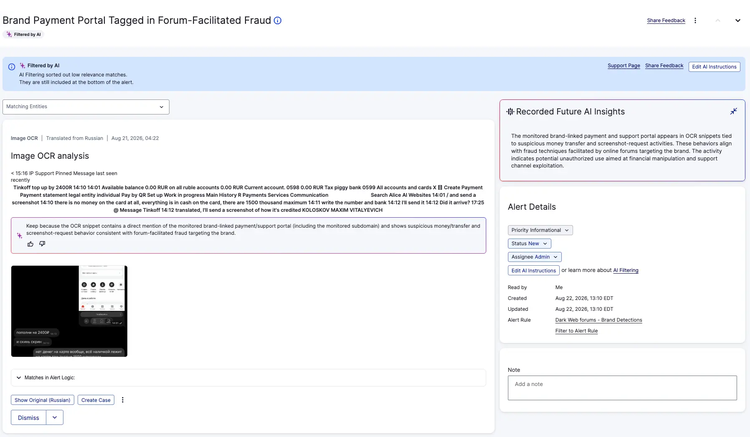
How it works
Open an Alert and the work is already partially done. At the top, an AI-generated title and summary tell you what came through and whether anything stands out. Below it, the High Relevance section surfaces the references that match your rule's intent, each with a one-line explanation of why the AI kept it. Lower relevance material sits beneath that, available when you need it, out of the way when you don't.
For each reference, the AI considers three things: the default intent Recorded Future authors for the alert rule, any custom intent added to that rule, and the content of the reference itself, including text, metadata, and image-derived signal. When a reference is ambiguous but plausibly threat-related, the AI keeps it rather than filtering it out.
If a rule fires and nothing clears the threshold, the Alert can be dismissed automatically before it reaches the queue. If a custom intent is set, the AI accounts for it, filtering to what matters for the organization, not just the default rule parameters. The full, unfiltered payload is available in the Portal.
How to get started
AI Alert Filtering is available today for all Recorded Future customers. Simply enable it from the Alerts page in the Portal and you're up and running.
For help getting started, explore the support page for more detail or contact us for a demo.
Frequently asked questions
Who gets this feature?
AI Alert Filtering is available to all Recorded Future customers at no additional cost. AI Alert Filtering will be turned on by default for all new customers and existing customers can enable it from the Portal. Explore the support page for more detail.
Why are we turning this on for all new customers?
Much like AI Insights saves time on searches by getting you to the right information faster, we believe this will do the same for alerts.
Why should I use AI Alert Filtering?
AI Alert Filtering handles the first pass of filtering Alerts by relevance so analysts open fewer Alerts, spend less time sorting through references, and have a clear rationale for every relevance call the AI makes. Customers with early access saw an average reduction in alert volume of around 63%, though results may vary based on rule configuration and use case.
I’m worried that you’ll be removing data that I might need to see. How can I stop this?
No content is removed from views by default. Alerts can be auto-dismissed if you choose. Irrelevant references can be removed from the API payloads sent if you choose.
Can I turn this on for some rules and not others?
Yes. AI Alert Filtering is enabled per rule, so you can test it on one before touching the rest.
What alert rules can I use AI Alert Filtering with?
At this time, AI Alert Filtering is available for classic and custom alert rules. We are actively working to expand support to additional rule types over time.
How does the AI decide what's relevant?
It considers the default intent for the alert rule, any custom intent you've added, and the content of the reference itself. When a reference is ambiguous but plausibly threat-related, the AI keeps it rather than filtering it out.
What happens if the AI is wrong?
Leave a thumbs down on the individual reference. We take that feedback to improve the system. The system will gradually improve over time as we garner more feedback.
Where can I find more information?
Your account team is the first stop for setup questions and help drafting custom intents. You can also contact us for a demo or explore the support page.