TAG-195 Upgrades MaaS Ecosystem with Modular Tools
Executive Summary
Insikt Group identified four new TAG-195 ("Golden Chickens", “Venom Spider”) malware families through ongoing tracking of the TAG-195 MaaS ecosystem. We named two of the families "TinyEgg" and “ChonkyChicken"; the third is a modularized variant of ChonkyChicken. The fourth family, which includes a modified browser credential theft helper, we named “ChromEggscalator". TAG-195 is a financially motivated malware-as-a-service (MaaS) developer whose tooling Insikt Group has previously linked to TAG-127 as an operator and customer. (Insikt Group has directly observed TAG-127 deploying TinyEgg via “ClickFix”-style campaigns that use fake security verification pages to trick victims into manually executing malicious commands that download and install malware payloads via a legitimate Windows system utility.)
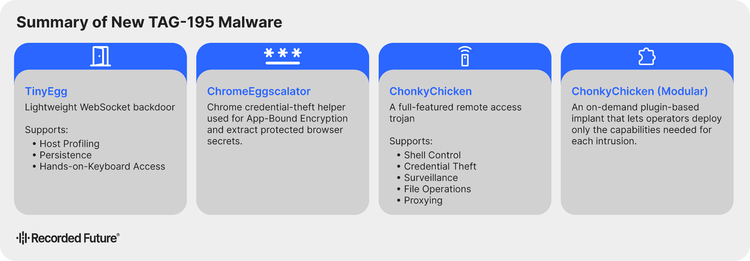
The four new families indicate an architectural transition and evolution in the TAG-195 MaaS ecosystem. TinyEgg is a lightweight initial-access backdoor providing host profiling, interactive shell access, and persistence management. ChonkyChicken substantially expands that capability with browser credential theft, browser session automation, credential-backed remote execution, network reconnaissance, and sustained surveillance. The modularized ChonkyChicken extends this design by introducing a controller-and-plugin architecture in which a base controller implant requests and loads discrete capability modules from attacker-controlled infrastructure on demand rather than embedding all functionality in the implant itself. TAG-195 also modified a publicly available Chrome encryption-bypass tool into a custom helper within the malware family that Insikt Group named ChromEggscalator. All four families share a common set of architectural traits: consistent command-and-control mechanisms, a shared persistence approach, string obfuscation, and execution via the same delivery model.
Insikt Group assesses that TAG-195’s transition to a modular architecture almost certainly reduces the base implant's static detection exposure, and likely also reflects commercial incentives inherent to the MaaS model, including the ability to provision capabilities selectively to operators, limit exposure if a customer is compromised, and serve a broader range of operational requirements. Defenders should prioritize detection of ClickFix-style clipboard execution chains, misuse of legitimate system utilities to load payloads from user-writable directories, suspicious startup persistence mechanisms, browser processes launched with remote debugging enabled, and unusual outbound communications to attacker-controlled infrastructure.
Key Findings
- Insikt Group identified four new TAG-195 malware families through its continued tracking of the TAG-195 MaaS ecosystem: TinyEgg, ChonkyChicken, a modularized variant of ChonkyChicken, and ChromEggscalator. Their identification indicates sustained active development and a deliberate architectural transition toward modular, operator-driven tooling.
- The modularized ChonkyChicken variant uses a controller-and-plugin architecture in which a base controller implant requests and loads at least fourteen capability modules on demand. Insikt Group assesses that this design almost certainly reduces the base implant's static detection footprint while enabling operators to deploy only what each intrusion requires.
- All four malware families share four recurring architectural traits that indicate their origin within the same TAG-195 development ecosystem: filename execution gating, Run key persistence under a consistent value name, string obfuscation, and execution via a legitimate Windows binary.
Background
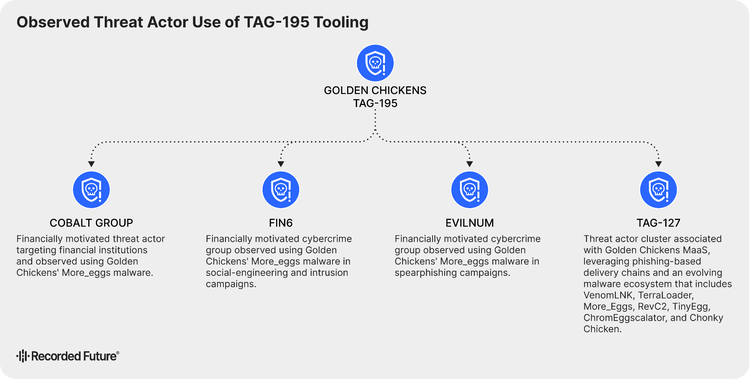
TAG-195, also known as “Golden Chickens” or "Venom Spider", is a financially motivated MaaS developer with a long-standing history of providing credential theft and remote access tooling to criminal operators. Insikt Group assesses TAG-195 as a MaaS provider based on the availability of its malware to multiple distinct threat actors and its sustained operation across successive generations of tooling. Public reporting by eSentire has previously linked TAG-195 tooling to FIN6, Cobalt Group, and Evilnum, three financially motivated criminal groups, suggesting the ecosystem serves a select customer base; however, details on sales models and access conditions remain unknown. Additionally, Insikt Group tracks TAG-127 as a threat group that uses the TAG-195 MaaS, with ClickFix or VenomLNK as delivery methods.
Insikt Group previously reported on this development trajectory in April 2025, identifying TerraStealerV2 and TerraLogger as new TAG-195 malware families reflecting ongoing development aimed at credential theft and keylogging. That reporting noted TerraStealerV2's inability to bypass Chrome App-Bound Encryption (ABE) protections and TerraLogger's lack of C2 capabilities as indicators that the tools are still under active development. The families documented in this report represent continued development of the TAG-195 MaaS ecosystem, building directly on that prior trajectory by introducing Chrome ABE bypass capabilities and more robust C2 functionality.
Technical Analysis
The four malware families documented in this report represent a generational step beyond the TAG-195 tooling Insikt Group reported on in April 2025. That prior generation, including TerraStealerV2 and TerraLogger, reflected a development program still resolving fundamental capability gaps: TerraStealerV2 lacked the ability to bypass Chrome ABE, and TerraLogger had no C2 capability at all, leading Insikt Group to assess it as likely intended for a modular role that had not yet been identified. The current generation directly resolves both limitations. Modular ChonkyChicken realizes the modular architecture TerraLogger hinted at. TinyEgg and ChonkyChicken replace opportunistic exfiltration with a structured, bidirectional WebSocket tasking framework that supports sustained operator-directed operations. ChromEggscalator addresses the ABE gap with a dedicated bypass helper. The progression from RevC2, TerraStealerV2, and TerraLogger to the current generation of TinyEgg, ChonkyChicken, ChromEggscalator, and Modular ChonkyChicken indicates a deliberate architectural transition rather than incremental updates to existing tooling, with the modular controller-and-plugin design representing the most structurally distinct departure from prior Golden Chickens development observed to date.
ClickFix Delivery and Infection Chain
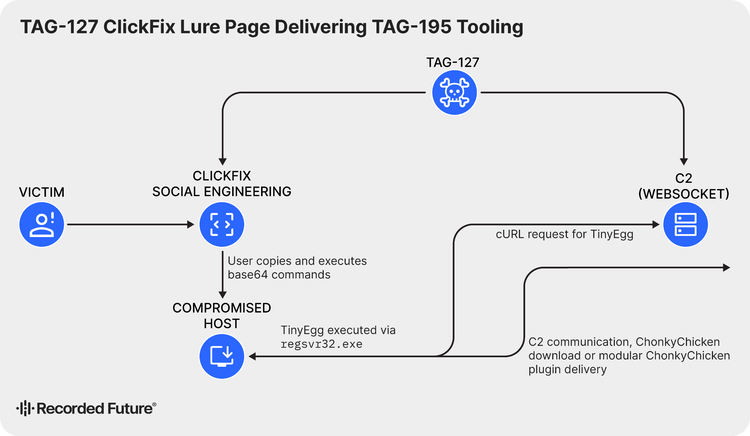
TAG-127's observed TAG-195 campaigns used ClickFix as the initial access mechanism. ClickFix is a social engineering technique in which victims are presented with a fake security verification web page, typically mimicking a CAPTCHA prompt, that instructs them to manually copy and execute a malicious command. This approach bypasses conventional file and email delivery controls by inducing the victim to execute the payload themselves. TAG-127's lure pages instructed victims to open a system run dialog and paste a command copied to their clipboard (see Figure 3). Those commands downloaded OCX payloads from attacker-controlled staging infrastructure and executed them using a legitimate Windows system utility, completing the initial installation of TinyEgg on the victim host.t
![A ClickFix social engineering webpage example hosted on screenly[.]cam, which instructs victims to copy and paste a malicious command to perform a fake security verification.](./media_131aa8b67eed88cb74e72faef34c978bf3f0cc190.png?width=750&format=png&optimize=medium)
Figure 3: ClickFix web page, screenly[.]cam, leveraged by TAG-127 to distribute malware
(Source: Recorded Future)
The delivery infrastructure used four lure domains (Appendix A) consolidated onto a single shared IP address, 70[.]34[.]205[.]43, alongside a dedicated domain, xtrafftrck[.]net, which served both payload staging and command-and-control (C2) functions.
TinyEgg represents the first stage of a two-phase infection. Following successful installation and host registration, TinyEgg can receive operator instructions to download and execute ChonkyChicken, thereby substantially expanding the capabilities available on the compromised host. The full infection chain is illustrated in Figure 4.
Insikt Group assesses that TAG-127's adoption of ClickFix delivery likely reflects the technique's effectiveness at circumventing email security controls and endpoint detection for file-based delivery methods, consistent with its broader adoption among financially motivated threat actors.
TinyEgg
TinyEgg differs from prior TAG-195 tooling in a manner consistent with a deliberate tiered design: where earlier families such as TerraStealerV2 combined delivery and collection within a single package, TinyEgg is limited to initial access functions, deferring all post-exploitation capability to ChonkyChicken. The agentType field in TinyEgg's registration message returns the value "tiny", indicating that the TAG-195 operator console likely distinguishes between implant generations and presents operators with different available actions depending on which implant is active on a given host.
Execution and Gating
TinyEgg is packaged as an OCX file and executed via a legitimate Windows system utility (regsvr32.exe), consistent with the broader TAG-195 execution model. Before initiating its main logic, TinyEgg verifies that its expected filename appears in both the active command line and the loaded module path. If either check fails, execution terminates immediately. This gating behavior prevents the implant from running outside its intended execution context, limiting its exposure in sandbox and automated analysis environments.
C2 ProtocolTinyEgg communicates with attacker-controlled infrastructure over WebSockets using a JSON-formatted, task-driven protocol. On initial contact, the C2 server issues a request_register command. TinyEgg responds with an agent_register message containing the victim's hostname, username, operating system, local IP address, domain or workgroup, and administrative privilege status (see Figure 5).
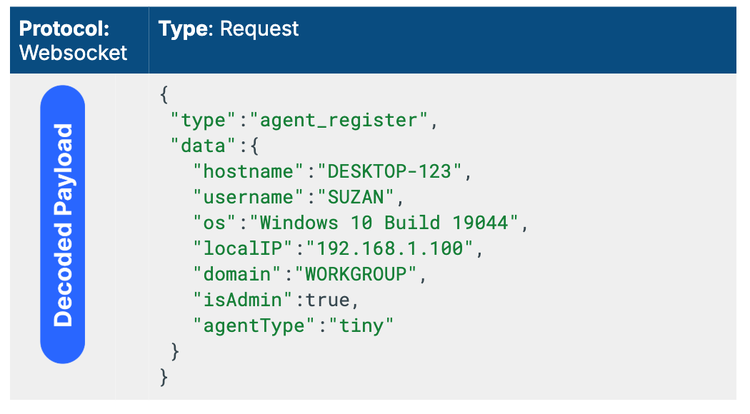
The use of WebSocket C2 poses an inherent challenge to network-based detection, independent of any application-layer obfuscation that TAG-195 applies. RFC 6455 mandates that all client-to-server WebSocket frames be XOR-masked with a per-frame random key included in plain text in the frame header. While this masking is easily reversible for analysts using standard tools such as Wireshark, signature-based intrusion detection systems cannot inspect WebSocket payload content without first implementing frame decoding, rendering content-based network signatures largely ineffective against this C2 channel. This protocol-level masking is also distinct from the application-layer XOR obfuscation TAG-195 applies to TinyEgg's operational strings, described below. The two represent separate and independent obfuscation layers.
Capabilities
TinyEgg's capabilities are intentionally narrow, consistent with its role as a first-stage implant whose primary purpose is to confirm access and prepare the host for ChonkyChicken. Interactive shell access is provided through four commands: shell_start, shell_input, shell_output, and shell_stopped. These launch a command interpreter in quiet mode and redirect input and output streams, giving operators a live command shell over the WebSocket channel.
Persistence is managed through persist_install and persist_remove. Installation stages the OCX payload to a user-writable local directory and creates a Run key pointing to the staged file, ensuring execution at each user logon via a legitimate Windows system utility. Removal deletes both the Run key value and the staged file. Each persistence operation returns a Boolean success or failure status via persist_result.
Commands
TinyEgg's command set reflects its role as a minimal first-stage implant. The nine observed commands cover only registration, interactive shell access, and persistence management.
request_registeragent_registershell_startshell_inputshell_outputshell_stoppedpersist_installpersist_removepersist_resultTable 1: TinyEgg commands and descriptions (Source: Recorded Future)
Insikt Group assesses that TinyEgg's narrow capability set likely reflects a deliberate design decision to limit the implant's static-detection exposure during the initial-access stage. Separating initial access from post-exploitation capability reduces the risk that an early detection of TinyEgg reveals the full TAG-195 capability set available to an operator on a given host. The agentType field in TinyEgg's registration message is consistent with this assessment: the use of a tiered identifier indicates the TAG-195 operator console likely distinguishes between implant generations, presenting operators with different available actions depending on which implant is active on a compromised host.
ChonkyChicken
ChonkyChicken represents the most fully featured implant in the current TAG-195 generation, consolidating browser credential theft, live browser session control, credential-backed lateral movement, network reconnaissance, and sustained surveillance within a single WebSocket-based framework. Insikt Group assesses that ChonkyChicken likely functions as a second-stage implant deployed after TinyEgg's initial access, with the two families' shared registration protocol, persistence model, and execution method indicating they were developed as complementary tiers within a common operational framework rather than as independent tools. ChonkyChicken's command set, detailed in Appendix B, is consistent with this assessment.
Execution and Gating
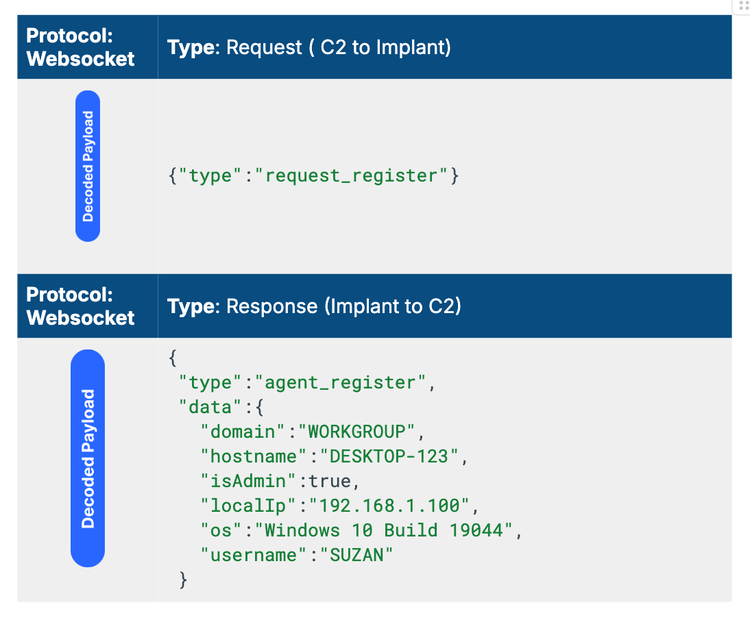
ChonkyChicken applies the same gating approach as TinyEgg, reinforcing that filename gating is a TAG-195 development standard. The implant masquerades as legitimate Windows component filenames and executes through its DllInstall export. Before proceeding, it validates that its expected filename appears in both the active command line and the loaded module path. If either check fails, execution terminates, and the implant writes a failure event to %TEMP%\lg.txt. That log file is forensically significant: its presence on a host is a reliable indicator of a ChonkyChicken execution attempt, whether or not the attempt succeeded. After initialization, ChonkyChicken profiles the host and registers with the controller using the same agent_register protocol as TinyEgg (see Figure 6), then remains connected as a long-lived task agent dispatching inbound operator commands through a central router.
Browser Credential Theft
ChonkyChicken's browser credential theft workflow resolves the most significant gap in the prior TAG-195 malware generation. Insikt Group's April 2025 reporting on TerraStealerV2 explicitly noted that the tool lacked the ability to bypass Chrome ABE, which the group assessed as evidence that the tool was still under active development. ChonkyChicken addresses that gap directly through a staged helper workflow using ChromEggscalator, a TAG-195-modified Chrome ABE bypass tool covered in detail in the ChromEggscalator section of this report.
The workflow follows a three-stage sequence. First, chrome_upload downloads ChromEggscalator, Base64-decodes it, and writes it to the victim's temporary directory. Second, chrome_ready confirms successful staging and returns the helper path to the controller. Third, chrome_extract executes the helper through a legitimate Windows system utility and collects the resulting output, including credential hashes and status data, from a temporary output directory. The collected material is packaged into a chrome_result message and exfiltrated to the controller.
Browser Session Automation
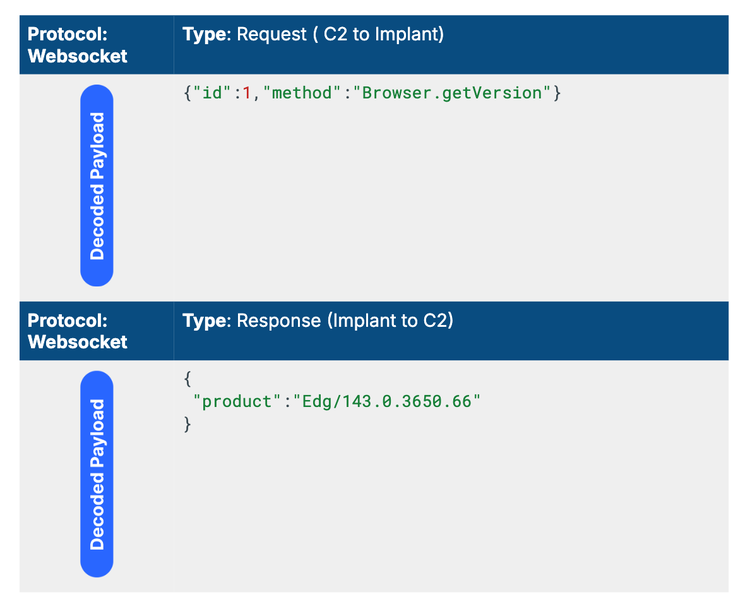
ChonkyChicken extends beyond static credential extraction by implementing native Chrome DevTools Protocol (CDP) automation, enabling operators to interactively control live, authenticated browser sessions. This capability is analytically significant beyond what credential theft alone provides: an operator with an active CDP session can act as the authenticated user in real time, accessing live session-state, on-screen content, and authenticated resources that exist independently of stored credentials. An organization that resets passwords after an incident but fails to detect an active CDP session remains compromised. The cdp_start command launches the Chrome or Edge browser off-screen using negative window coordinates, enables remote debugging, and removes Chromium singleton artifacts before connecting to the local CDP endpoint. Operators relay CDP messages directly to the browser session via cdp_send, and cdp_message returns the browser's responses to the controller. Observed CDP traffic confirmed successful connection to a live browser session, with a Browser.getVersion request returning an active Edge version string (see Figure 7).
Credential Operations and Lateral Movement
ChonkyChicken's lateral movement capability transforms a single compromised host into a potential pivot point across the victim network, supporting the sustained operator-directed operations that the modular architecture is designed to enable. The implant imports Windows APIs for credential use and token manipulation, and retains command strings for the creation, execution, and deletion of remote scheduled tasks. Credential-backed execution via cred_exec and token-based execution via token_run provide operators with multiple paths to move laterally, depending on the credentials or tokens available on the host.
The remote_logon capability is particularly notable from a detection standpoint: it passively enumerates logged-on sessions without submitting credentials, generating no authentication events. This gives operators session visibility useful for lateral movement planning without alerting defenders. Observed cred_logon failures returned structured JSON error output, confirming the implant handles authentication errors.
Network Reconnaissance
ChonkyChicken's network reconnaissance capability is designed for enterprise environments, providing operators with a near-complete picture of the victim's local network before any lateral movement is attempted. TCP port scanning via net_port_scan identifies active services, including SMB, RDP, WinRM, SQL Server, PostgreSQL, HTTP/S, and SSH. ARP-based host discovery via net_arp_scan returns active hosts with their IP addresses, hostnames, and MAC addresses. The net_enumerate workflow combines ARP discovery, NetBIOS resolution, TCP scanning, and SMB enumeration into a single operation, returning IP address, MAC address, hostname, fully qualified domain name, domain name, operating system, and open ports. Share enumeration via net_share_enum identifies accessible remote network resources. Monitor topology enumeration via monitor_list records displays dimensions, coordinates, and the primary monitor status, likely supporting screen-capture targeting decisions.
The scope of this reconnaissance suite confirms that ChonkyChicken is not designed for opportunistic single-host credential theft. It is designed for operators who need to understand a network before moving through it.
Surveillance and Collection
ChonkyChicken supports four persistent surveillance capabilities that collectively provide operators with comprehensive real-time visibility into victim activity. Keylogging via dedicated commands records active window titles alongside captured keystrokes, providing context for interpreting captured input. Clipboard monitoring collects plaintext clipboard contents through clipboard_data messages. Audio capture returns Base64-encoded WAV-format recordings through audio_data messages. Screen capture uses Graphics Device Interface APIs to transmit live frames as raw binary WebSocket data rather than JSON-formatted messages.
WPAD Helper
ChonkyChicken retains a Web Proxy Auto-Discovery (WPAD) helper workflow that, when operational, positions the implant as a network proxy capable of intercepting victim network traffic. Similar to the chrome_upload task, WPAD functionality is enabled by delivering wpad_capture.ocx via a wpad_start task. At the time of analysis, this OCX file had not been observed.
Persistence
ChonkyChicken uses the same persistence model as TinyEgg: the payload is staged to a user-writable local application data directory, and a Run key is created that points to the staged file, ensuring execution via a legitimate Windows system utility at each user logon. Removal deletes both the Run key value and the staged OCX file. The consistency of this approach across both implant generations is itself analytically significant. It confirms a TAG-195 development standard rather than independent implementation decisions, and means a single behavioral detection covering the Run key creation pattern applies across the entire current tool set.
ChromEggscalator
ChromEggscalator is a TAG-195-modified version of ChromElevator, a publicly available open-source Chrome ABE bypass tool. Insikt Group's April 2025 reporting on TerraStealerV2 found that the family lacked ABE bypass capabilities, indicating that the credential theft implementation was either outdated or under active development at that time. ChromEggscalator addresses this limitation directly, and its integration into ChonkyChicken's staged browser theft workflow indicates it likely functions as a dedicated helper component within the TAG-195 ecosystem rather than as a standalone capability. TAG-195 developers modified the original tool by removing its command-line interface, repackaging it as an OCX file, adding filename validation logic, and redesigning its output model to support programmatic collection by ChonkyChicken's chrome_extract command.
Origin and Modifications
TAG-195 made four specific modifications to adapt ChromElevator for use within its ecosystem, as what we call ChromEggscalator. First, the original command-line interface was removed entirely, preventing interactive use outside of its intended deployment context. Second, the tool was repackaged as an OCX file executable via a legitimate Windows system utility, aligning it with the standard TAG-195 execution model used across TinyEgg, ChonkyChicken, and Modular ChonkyChicken. Third, filename validation logic was added, requiring chromelevator.ocx to appear in both the command line and loaded module path before execution proceeds. Fourth, detailed operational logging to C:\ProgramData\xlog.txt was added, covering browser discovery, API resolution, output directory creation, and extraction activity.
The debug strings embedded in the validation logic are notable for more than their technical function. The checks report their results as Koki=[YES/NO] and Blat=[YES/NO]. The term "Koki" also appears as the controller filename in Modular ChonkyChicken, suggesting shared naming conventions across the development ecosystem and pointing toward a common developer or development environment across both tools.
Execution and Gating
ChromEggscalator executes through DllRegisterServer and applies the same filename gating approach used across the broader TAG-195 tool set. Before any operational logic runs, the tool validates that chromelevator.ocx appears in both the active command line and the loaded module path. If either check fails, execution terminates immediately. This prevents ChromEggscalator from running outside ChonkyChicken's controlled staging workflow, limiting its exposure in automated analysis environments.
Operational Behavior
Once gating checks pass, ChromEggscalator performs browser discovery, resolves the APIs required for ABE bypass, creates its output directory structure, and executes credential extraction. Extracted credential material, including hashes and status data, is written to a structured output directory under %TEMP%\output\, where ChonkyChicken's chrome_extract command collects it and packages it for exfiltration via chrome_result.
Forensic Artifacts
ChromEggscalator writes a detailed operational log to C:\ProgramData\xlog.txt covering browser discovery, API resolution, output directory creation, and extraction activity. This log file is a reliable forensic indicator on any host where ChromEggscalator has executed, regardless of whether credential extraction succeeded. It is also distinct from ChonkyChicken's own log file at %TEMP%\lg.txt, meaning the two log files together can help analysts reconstruct the sequence of events on a compromised host.
The modifications TAG-195 developers made to ChromElevator — removing the command-line interface, adding filename gating, repackaging it as an OCX file, and redesigning the output model — are consistent with the execution and collection patterns applied across TinyEgg, ChonkyChicken, and Modular ChonkyChicken. Insikt Group assesses that these modifications likely reflect a deliberate effort to integrate ChromEggscalator into the existing TAG-195 execution ecosystem, as each change aligns the helper’s behavior with established TAG-195 development standards.
Modular ChonkyChicken
Modular ChonkyChicken represents a significant architectural departure from earlier TAG-195 malware. Rather than extending ChonkyChicken’s original all-in-one design, TAG-195 developed a dedicated controller implant responsible for WebSocket communications, host registration, task routing, and module lifecycle management, while operational capabilities are delivered via discrete plugins retrieved from C2 infrastructure as needed. Insikt Group assesses that this architecture likely reflects a deliberate shift toward operator-directed capability deployment rather than an incremental evolution of the existing implant, as the modular design reduces the static footprint of the base implant and enables selective delivery of functionality that monolithic malware architectures cannot readily support.
Controller Architecture
The Modular ChonkyChicken controller is delivered as an OCX file named koki.ocx or agent.ocx, and it executes via DllInstall as its primary execution path. Before any operational logic runs, the controller validates that koki.ocx appears in both the active command line and the loaded module path, consistent with the filename gating standard applied across every TAG-195 component in this report.
On initialization, the controller profiles the host, resolves required APIs, and establishes a WebSocket connection. The observed C2 endpoint during analysis was ws://localhost:3000/ws/agent. The use of localhost rather than an external C2 address almost certainly reflects a development or testing configuration rather than production infrastructure, suggesting Modular ChonkyChicken was captured at an early stage of operational deployment.
Module Loading
The controller maps inbound operator commands to capability modules rather than embedding functionality in the base implant. When a required module is not present on the host, the controller sends a module_request message to C2. The returned module is Base64-decoded, written to a randomly named temporary file, and loaded into memory through LoadLibraryA. This on-demand delivery model means the base controller implant contains no operational capability at rest; a defender who detects and captures the controller alone captures only the orchestration layer, not the capabilities it can deploy. A full list of module handling messages is provided in Table 2.
module_requestmodule_loadmodule_loadedmodule_unloadmodule_unloadedmodule_listmodule_list_resultTable 2: Modular ChonkyChicken module-handling commands (Source: Recorded Future)
Module Interface
Each module exposes a standardized three-function export interface:
module_inithandles module initialization and setup.module_handleprocesses inbound operator commands routed by the controller.module_cleanupmanages teardown when the module is no longer required. This standardized interface confirms that the module architecture was designed with extensibility in mind; new capabilities can be added to the ecosystem without modifying the controller, as long as they conform to the same export pattern.
Module Inventory
At least fourteen capability modules have been identified, spanning the full operational range of ChonkyChicken's monolithic design. A detailed list of the supported module names and commands is provided in Table 3.
procmgrprocess_list, process_killscreenscreen_start, screen_stop, monitor_listfilesfile_list, file_download, file_delete, file_uploadshellshell_start, shell_input, shell_stopnetworknet_arp_scan, net_port_scan, net_share_enum, net_enumeratedomaindomain_info, domain_users, domain_computers, domain_groups, domain_group_members, domain_sessions, domain_trustsclipboardclipboard_start, clipboard_stopkeylogkeylog_start, keylog_stopwtrackwtrack_start, wtrack_stopaudioaudio_start, audio_stopidleidle_statusproxyproxy_requestchromechrome_upload, chrome_extractpersistpersist_install, persist_removeTable 3: ChonkyChicken module command mappings (Source: Recorded Future)
Note that the wtrack module exposes the wtrack_start and wtrack_stop commands, but their purpose could not be determined from the available analysis. Its naming convention is consistent with the broader TAG-195 module taxonomy, and its presence in the module inventory suggests an active capability under development.
WPAD Retention
The modular branch retains the WPAD helper workflow present in ChonkyChicken. During wpad_start, the controller writes %TEMP%\wpad_capture.ocx, dynamically loads it, and invokes DllRegisterServer, reporting status through the same wpad_started, wpad_stopped, wpad_result, and wpad_hashes_result messages observed in ChonkyChicken. Its retention across both variants, despite the absence of a recovered WPAD helper sample, indicates TAG-195 developers consider WPAD interception a priority capability for the ecosystem.
The modular architecture confirms that TAG-195 is redesigning its tooling around a modular principle: deploy only what each intrusion requires, keep a minimal static footprint, and extend capabilities through plugins rather than installing updates
Defense Evasion and Shared Architectural Characteristics
The four families documented in this report, TinyEgg, ChonkyChicken, Modular ChonkyChicken, and ChromEggscalator, share consistent traits that confirm a single coherent development framework operating to a deliberate design standard, not a collection of independently developed tools that happen to overlap. Every component in TAG-195’s current generation of malware applies the same evasion logic consistently.
Shared Defense Evasion Traits
Four evasion characteristics are present across all families in the current TAG-195 tool set.
- Filename gating: All four components validate that their expected filename appears in both the active command line and the loaded module path before executing any operational logic. If either check fails, execution terminates immediately, preventing the implant from running in sandbox environments, automated analysis pipelines, or any context outside its intended deployment workflow.
- OCX packaging and execution via regsvr32.exe: Every component is delivered as an OCX file and executed via
regsvr32.exe(a legitimate Windows binary), providing execution coverage while avoiding outright binary blocking that would break legitimate COM registration on managed endpoints. - String obfuscation: TinyEgg uses XOR encryption with a static 32-byte key, whereas ChonkyChicken uses AES encryption. The progression from XOR to AES across implant generations suggests TAG-195 developers are actively hardening obfuscation as the ecosystem matures, applying lighter implementations to the initial-access tier and stronger ones to the full post-exploitation framework.
- WebSocket frame masking per RFC 6455: All C2 communications across TinyEgg, ChonkyChicken, and Modular ChonkyChicken benefit from the inherent XOR masking mandated by the WebSocket protocol, rendering content-based network signatures largely ineffective across all three implants simultaneously without requiring additional development effort.
Shared Architectural Characteristics
Three architectural traits confirm a common development origin across TAG-195’s current generation of malware, independent of evasion intent:
- WebSocket-based C2 using a JSON-formatted, task-driven protocol: The registration exchange, a
request_registerfrom the controller followed by anagent_registerresponse, is identical in structure across TinyEgg, ChonkyChicken, and Modular ChonkyChicken, with only theagentTypefield distinguishing them. This shared protocol indicates the operator console is designed to manage multiple implant tiers through a common interface. - Run key persistence under a consistent value name: TinyEgg and ChonkyChicken both stage their OCX payload to a user-writable local application data directory and create a Run key
HKCU\Software\Microsoft\Windows\CurrentVersion\Run\WinComCtlpointing to the staged file. The identical persistence model means that a single behavioral detection covers both implant generations, but also means an operator who removes one implant's persistence without removing the other's leaves a detectable artifact behind. - DLL export execution through
DllInstallorDllRegisterServer: TinyEgg and ChonkyChicken useDllInstall; ChromEggscalator usesDllRegisterServer, but both are standard COM registration exports, providing consistent execution cover across the ecosystem.
The shared evasion traits and architectural characteristics documented in this report indicate that the TAG-195 MaaS ecosystem is undergoing a deliberate architectural transition rather than opportunistically producing new tools. A development framework that applies identical filename gating logic, persistence models, and execution methods across four independently deployable components is likely operating to a common design specification. Insikt Group assesses that the modular architecture likely represents the latest expression of that specification, consistent with a development approach oriented toward reducing exposure to static detection and enabling selective deployment of operator capabilities across a varied customer base.
Mitigations
Recorded Future-Based Detections
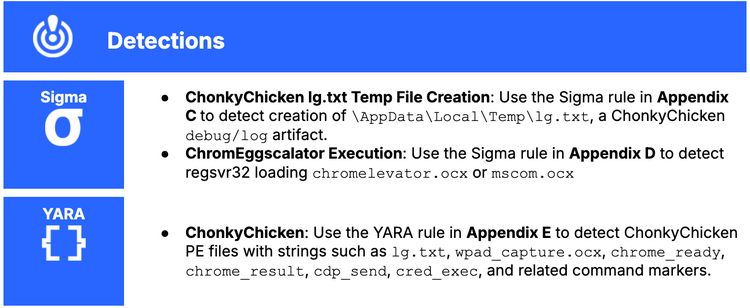
Customers can deploy Recorded Future Hunting Packages and intelligence-driven detections for this new set of TAG-195 malware, including the Sigma and YARA rules shown below.
ClickFix Delivery and Initial Execution
These controls address T1189 (Drive-by Compromise), T1204.004 (User Execution: Malicious Copy and Paste), T1059.003 (Command and Scripting Interpreter: Windows Command Shell), and T1218.010 (System Binary Proxy Execution: Regsvr32) relating to the ClickFix delivery chain and regsvr32-based OCX payload execution observed across all TAG-195 families in this report.
- Restrict or disable the Windows Run dialog via Group Policy, where operationally feasible, to prevent the execution of pasted commands without user privilege escalation.
- Enforce PowerShell Constrained Language Mode for standard users and block the execution of unsigned scripts to limit the command types available to ClickFix payloads.
- Deploy WDAC, AppLocker, or EDR prevention rules to block
regsvr32.exefrom loading.dllor.ocxfiles from user-writable directories, including%TEMP%,%APPDATA%,%LOCALAPPDATA%,Downloads, browser cache paths, and%LOCALAPPDATA%\Packages\. - Alert on or block execution of
cmd.exe,powershell.exe,wscript.exe,cscript.exe,mshta.exe, andregsvr32.exewhen invoked from web-delivered or email-delivered workflows.
Persistence
These controls address T1547.001 (Registry Run Keys / Startup Folder) Run key persistence under HKCU\Software\Microsoft\Windows\CurrentVersion\Run\WinComCtl, observed identically across TinyEgg and ChonkyChicken.
- Monitor for creation of Run key values under
HKCU\Software\Microsoft\Windows\CurrentVersion\Runthat reference OCX files in user-writable directories. A single detection covering this pattern applies to both TinyEgg and ChonkyChicken across the current TAG-195 generation. - Alert on
regsvr32.exeinvocations referencing files staged under%LOCALAPPDATA%\Packages\, the consistent OCX staging location observed across all TAG-195 families in this report.
Browser Credential Theft and CDP Abuse
These controls address T1555 (Credentials from Password Stores) and T1528 (Steal Application Access Token), associated with browser credential extraction via ChromEggscalator and live browser session control via CDP automation, as observed in ChonkyChicken.
- Block or alert on Chrome and Edge processes launched with
--remote-debugging-portarguments, particularly on non-standard port values and in combination with off-screen window positioning flags such as--window-position=-32000,-32000. - Disable browser-based password storage where operationally feasible and migrate users to an enterprise password manager. Credential rotation following an incident does not terminate an active CDP session; investigate for CDP activity independently of credential hygiene.
- Enforce FIDO2 or phishing-resistant MFA for high-value applications to reduce the impact of browser-stored credential theft even where ABE bypass is successful.
- Monitor for creation of
chromelevator.ocxormscom.ocxin%TEMP%and forxlog.txtinC:\ProgramData\, both of which are reliable forensic indicators of ChromEggscalator execution.
Network Detection
These controls address T1071.001 (Web Protocols) and T1090 (Proxy), which relate to WebSocket-based C2 and proxy functionality observed across TinyEgg, ChonkyChicken, and Modular ChonkyChicken.
- Route workstation web traffic through authenticated proxies and deny direct outbound traffic to non-standard ports. Block outbound port 3000 unless explicitly required by a business application, as this port is the observed WebSocket listener across all three C2-capable TAG-195 families.
- Implement WebSocket frame decoding capability in network inspection tooling where technically and legally permissible. Content-based signatures are ineffective against RFC 6455-masked WebSocket traffic without prior frame decoding. Prioritize behavioral detections for WebSocket connections on non-standard ports and for consistent endpoint path patterns, such as
/ws/agent. - Restrict direct-to-IP HTTP and HTTPS traffic at the perimeter to reduce attacker infrastructure reachability independent of domain-based blocking.
Lateral Movement
These controls address T1046 (Network Service Discovery), T1135 (Network Share Discovery), T1087.002 (Domain Account), T1049 (System Network Connections Discovery), T1018 (Remote System Discovery), T1021 (Remote Services), and credential-backed execution observed in ChonkyChicken.
- Remove local administrator rights from standard user accounts and enforce least-privilege principles across the environment. ChonkyChicken supports credential-backed execution, token-based lateral movement, remote scheduled task creation, network share enumeration, and multi-phase host discovery. East-west restrictions reduce the operational value of each of these capabilities.
- Deploy Windows Local Administrator Password Solution (LAPS) and rotate local administrator credentials regularly to reduce the value of credentials obtained via browser theft or keylogging.
- Restrict
schtasks /s, WinRM, SMB administrative shares, and RDP between workstations. ChonkyChicken's remote-scheduled-task command strings are designed for lateral movement via these services. - Require privileged access workstations for all administrative activity and block bring-your-own-device access to privileged or developer workflows.
Long-Term Resilience
- Maintain Recorded Future watchlists for TAG-195 infrastructure, lure domains, OCX filenames, WebSocket paths, payload hashes, hosting providers, and associated malware samples to enable timely detection of new campaign infrastructure.
- Emulate the non-malicious elements of the TAG-195 infection chain in purple-team exercises: ClickFix copy-paste prompts,
regsvr32loading a benign OCX from%TEMP%, WinComCtl Run key creation, Chrome remote-debugging launches, and outbound WebSocket connections to non-standard HTTP ports. Validate that EDR, proxy, firewall, SIEM, and SOAR controls trigger on each step
Outlook
Insikt Group assesses that TAG-195 will likely continue to iterate on its MaaS ecosystem, with an emphasis on development in modular payload delivery, browser credential access, and operator-driven post-compromise functionality. The progression from TerraStealerV2 and TerraLogger, documented in Insikt Group's April 2025 reporting, to the current generation of TinyEgg, ChonkyChicken, Modular ChonkyChicken, and ChromEggscalator, indicates sustained toolchain development rather than isolated malware production. The localhost C2 configuration in Modular ChonkyChicken suggests that portions of the current ecosystem remain under active development, and additional capability updates are likely.
The modular architecture introduced in the latest ChonkyChicken variant has implications for both defenders and TAG-195 operators that Insikt Group assesses will likely persist and deepen as the ecosystem matures. For defenders, a controller-only capture of a Modular ChonkyChicken deployment provides limited visibility into operational intent, as the base controller implant contains no operational capability at rest, and the module inventory available to a given operator is not recoverable from the controller alone. Detection efforts should prioritize the controller's behavioral indicators, WebSocket registration traffic, Run key creation, and OCX execution patterns, rather than capability-specific signatures that the modular design is structured to withhold. For TAG-195 as a MaaS provider, the modular architecture likely enables more flexible commercial packaging, selective capability provisioning to operators, and compartmentalization of operator activity, consistent with the operational and commercial incentives of a mature MaaS ecosystem.
Future TAG-195 activity will likely continue to feature ClickFix-style delivery, OCX payloads executed via regsvr32.exe, WebSocket C2, Run key persistence under a consistent value name, and on-demand module delivery. The wtrack module identified in the current Modular ChonkyChicken inventory, whose purpose could not be determined from available analysis, indicates at least one capability area under active development that may become observable in future TAG-195 deployments. Insikt Group will continue to monitor TAG-195 infrastructure, malware samples, and operator activity for further development across the current tool set and any subsequent tooling generations.
Appendix A: IoCs
aurekh[.]com, ahdaratlegalservices[.]com, screenly[.]cam, paysolutions[.]ink70[.]34[.]205[.]43xtrafftrck[.]net/ws/agent3000thessa[.]trackgrid[.]net65[.]20[.]102[.]16165[.]20[.]105[.]177108[.]61[.]209[.]100updater.ocxmscomctl.ocx%TEMP%\mscom.ocxchromelevator.ocxkoki.ocx
agent.ocx
%TEMP%\wpad_capture.ocx%LOCALAPPDATA%\Packages\HKCU\Software\Microsoft\Windows\CurrentVersion\Run\WinComCtlregsvr32 /s /i "<staged_path>"%TEMP%\lg.txtC:\ProgramData\xlog.txt127[.]0[.]0[.]1[:]9222--remote-debugging-port=9222, --user-data-dir=<profile_dir>, --window-position=-32000,-32000b7b322f4638ead5c39031ffc7ca8c791c8d47211b09449f7ceb49f0c32a19b4533a12c2328db22429c4a515400a57ffeaf7aec48a2a3c299ab6f1ce2d2b0e87d7ee371ff1a13a3bbd26c925a9beedb1aa0d0c03fe6f63d3803a3a55aaccd0a5b6922b319dc96d020738bcf466c4d6d9233e4767b68592e1fd9258a232f166ce1086273cd91f3d6556ed2af915df310e4b184b3db84c3903aa09830d49d1fbb62652346c05123b4c9556c27f5c5efc4bcd941dd66957e3797c6751246a2bff9c6f3f4de7eb30c01044ad3c7f2c22376d0ab6f6dc60ef6aee3cde75fd33fbddacc6c23b7723a9f69ea48f02c8fe13fd60ecbfc2fb28e32e481c46ec968a66c66cdc455c02ca6b3844027e05d941830de97753c3966dd57c5fa9f1938d8cd1cca3bd2e1ab10d5a0c16a724aeda8acb46b38f551ade58137969c3bc3c9cdc0a124253250adbca0a0bfeab8bd88ee93b603be31fc86b341fd77a152b4843416560d535cae5202ddcc29f19f954d81ba138f11b8a4080d05fef63c05a00b9242c06967ccb6be9211b3946d290e8b23497b8f0e6ac045d1dcde4aaae424680e9029e4eb5d585f2b24503a96011bbe928f42b1b663946e822b309f8496573c66b5ee834c9a2d714ddd5c48722c35df8a70e97f12d46bcde05dc79b7242a7e692bd346826d5dea9a51b984be9d7fa76e3e8ff89cfb97c335927331e8e348b9ee269070c1bc4e2af286ee2ed12375bb66a5bff1a9d3bb5a6579842bc3a28ac00dfae195adca3a0aced0f3c13b0b9890ec74802a1cb4936bccfaf5e8a6a52f555c82e09d92ff3d2ad7440a6f985846710d2dcf0dd2db268dc690837bdf19e4e4e66844835276c7619c34497f430c4f7618cfefe07d1defacfae48f6730c20f52e7a7344faa941aa04782e436345ef45dc159321d5c0e0e5cba300e55a4d1d3194e5c7c5fd97337e92c233edc38842c6122fa38e0e84a478f5aa5af2a95ca6be3ca056d925b8c4e55e9e6837de01f0dadc7db299abd48630bf115a442f09ea0c6a593c559e6f6adf68448b8541e3cbe4a471845cb6c2ac07613f08698567e5ed76dc2a921834be7b80f42b0d859b7afaeefca04e46dc10fb5c0a532692bbbfef2924254d117545c8cbaeb5c7708e7b8030e701747c65203958e82eddc41f39e0ca93bd36c114e481d16e51f90c4cc0e7096284b53eef06f7ee8b37a03d92734521d8bca24409e3153ced59bb0376186b0eee0ec68f0b5aa9ae5820ef8508ae4e67625e1a358116735cb80d796865b2430aa11d21a539fcb00b027932f2c63e4b5c098d26585bTable 5: Configuration and Operational Artifacts Associated with TAG-195 Malware (Source: Recorded Future)
Appendix B: ChonkyChicken Commands
request_registeragent_registershell_startshell_inputshell_outputshell_stopshell_stoppedfile_listfile_downloadfile_uploadpersist_installpersist_removepersist_resultchrome_uploadchrome_readychrome_extractchrome_resultcdp_startcdp_sendcdp_stopcdp_messagecred_logoncred_execdomain_infodomain_usersdomain_computersdomain_groupsdomain_group_membersdomain_sessionsdomain_trustskeylog_startkeylog_stopkeylog_dataaudio_startaudio_stopaudio_dataclipboard_startclipboard_stopclipboard_dataremote_logontoken_runnet_port_scannet_arp_scannet_enumeratenet_share_enummonitor_listprocess_listprocess_killproxy_requestscreen_startscreen_stopwpad_startwpad_stopwpad_hasheswpad_resultwpad_stoppedwpad_hashes_resultAppendix C: TAG-195 ChonkyChicken lg.txt Temp File Creation (Sigma Rule)
title: TAG-195 ChonkyChicken lg.txt Temp File Creation
id: 1dad7fb5-4faf-47a9-92e5-2e7d796766b8
status: stable
description: Detects creation of the lg.txt debug log in AppData\\Local\\Temp, which has been observed during TAG-195's ChonkyChicken DllInstall gating and early agent execution.
references:
 - sha256:200fbc76bd9fab3b4adcecfe44233cf47146f5709a9735a0232cb4aa7284eadb
authorL Insikt Group, Recorded Future
date: 2026-05-14
logsource:
 product: windows
 category: file_event
detection:
 chonkychicken_lg_txt_creation:
   TargetFilename|endswith: '\AppData\Local\Temp\lg.txt'
 condition: chonkychicken_lg_txt_creation
level: high
tags:
   - attack.t1074.001 # Local Data Staging
falsepositives:
 - Unlikely
Appendix D: TAG-195 Golden Chickens ChromEggscalator Execution (Sigma Rule)
title: TAG-195 ChromEggscalator Execution
id: ae20a8bf-bf7b-436e-900d-b98af919ddc3
status: stable
description: Detects execution of the modified Chomelevator browser theft tool used by TAG-195.
references:
 - Internal research
author: Insikt Group, Recorded Future
date: 2026-04-27
level: high
tags:
 - attack.t1555.003 # Credentials From Password Stores: Credentials From Web Browsers Execution
 - attack.t1218.010 # System Binary Proxy Execution: Regsvr32
logsource:
   product: windows
   category: process_creation
detection:
   command:
     CommandLine|contains|all:
       - 'regsvr32'
       - '\chromelevator.ocx'
   condition: command
falsepositives:
 - Unlikely
Appendix E: TAG-195 ChonkyChicken (YARA Rule)
rule MAL_TAG195_ChonkyChicken
{
    meta:
        author = "Insikt Group, Recorded Future"
        date = "2026-05-14"
        description = "Detects ChonkyChicken used by TAG-195."
        version = "1.0"
        reference = "https://tria.ge/260428-mhxf1agt7w"
        hash = "5d585f2b24503a96011bbe928f42b1b663946e822b309f8496573c66b5ee834c"

    strings:
        $s1 = "Koki cmd=["
        $s2 = "Blat path=["
        $s3 = "lg.txt" fullword
        $s4 = "wpad_capture.ocx" fullword
        $s5 = "output\\hashes.json"
        $s6 = "schtasks /create /s "
        $s7 = "token_run" fullword
        $s8 = "whoami" fullword
        $s9 = "chrome_ready" fullword
        $s10 = "chrome_result" fullword
        $s11 = "cdp_send" fullword
        $s12 = "cred_exec" fullword

    condition:
        uint16(0) == 0x5A4D and
        all of ($s*)
}