
Recorded Future Launches New Automation Capabilities for Tech Stack Watch List
Recorded Future Launches the Tech Stack Watch List Connector
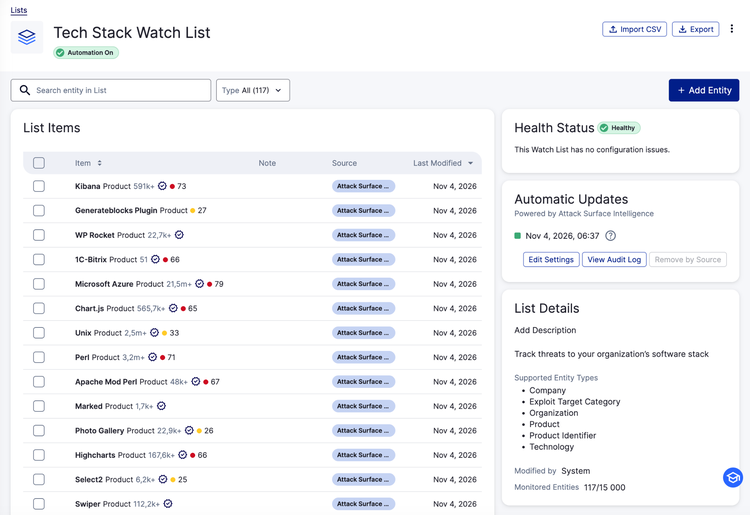
Today, Recorded Future is announcing the Tech Stack Watch List Connector, an automation that helps to keep a customer’s Tech Stack Watch List in sync with the products running in their environment. The connector pulls from security tools customers already use, including Tenable Vulnerability Management, Recorded Future Attack Surface Intelligence, and coming soon for Microsoft Defender XDR.
A Tech Stack Watch List that keeps pace with your environment
Watch Lists are how security teams tell Recorded Future what matters to them. The more accurate the list, the more relevant the intelligence can be that comes back. Accuracy depends on keeping the list current, and the Tech Stack Watch List has the most moving parts. Software is installed, patched, and retired constantly.
The information needed to track those changes already lives in the tools security teams run every day. Moving it into a Watch List by hand works, but exports and CSV uploads take time analysts could spend on the intelligence itself.
Introducing the Tech Stack Watch List Connector
The Tech Stack Watch List Connector is designed to put that data to work. It draws on software discovery data from tools a team has already deployed, populates the Tech Stack Watch List from it, and keeps the list in sync on a schedule the team sets. That means less manual upkeep.
The connector adds to Recorded Future’s Watch List automation capabilities. Customers can already automate their IP, Domain, and Vulnerability Watch Lists, including with the Watch List Connector for Tenable Vulnerability Management, and the Tech Stack Watch List now joins them. Together, these connectors help teams get more from their Watch Lists with less manual effort.
What this means for security teams
When the Tech Stack Watch List already holds the products in the environment, Recorded Future can surface early warning on at-risk products at disclosure, rather than after a detection ships and a scan completes. For vulnerability management leads and security operations analysts, that may shorten the window in which a team is exposed without knowing it.
New software can show up in the Tech Stack Watch List without a ticket or a spreadsheet, so analysts spend more of their time on the intelligence instead of the list that feeds it.
The connectors also pair well with the Vulnerability Watch List. For customers running both, one feeds in the vulnerabilities the scanner found and the other the products it saw. Used side by side, they tie more of the internal environment to the external threat picture.
Getting started
Open the Integration Center, find the connector for your tool, enable the connector, and choose how often to sync. After the first sync, review the Tech Stack Watch List to confirm it reflects your environment.
Learn more about Recorded Future’s Cyber Operations, browse our integrations, or request a demo.
Frequently Asked Questions
Who gets access to the Tech Stack Watch List Connector, and when is it available?
Customers with the Vulnerability Intelligence Module, Threat Intelligence Module, or Cyber Operations solution can use the connector as part of their current pricing and packaging at no additional cost. Availability varies by integration as connectors roll out, so see the support article for the current list.
How is this different from the Vulnerability Watch List connectors?
Vulnerability Watch List connectors add the CVEs your scanner has detected. The Tech Stack Watch List Connector adds the products and software versions in your environment, giving Vulnerability Intelligence and Threat Intelligence another way to report on what matters to you.
If my Tech Stack Watch List is already populated, will the connector update what’s there?
Yes. The connector can update your existing Tech Stack Watch List to reflect what’s currently live in your environment as reported by the connected integration. It adds new entities without creating duplicates.
Can I still add items manually?
Yes. You can still add items manually whenever you want. Manually added entities carry a manual tag, and entities added by the connector carry the name of the connector tag, so you can always see where each entry came from.
How often does it sync?
You choose the sync frequency when you configure the connector. We recommend aligning it with how often your tools refresh discovery data.
Where can I find more information?
For more detail contact us with any questions.