
Recorded Future Launches Impact and Metrics Dashboard
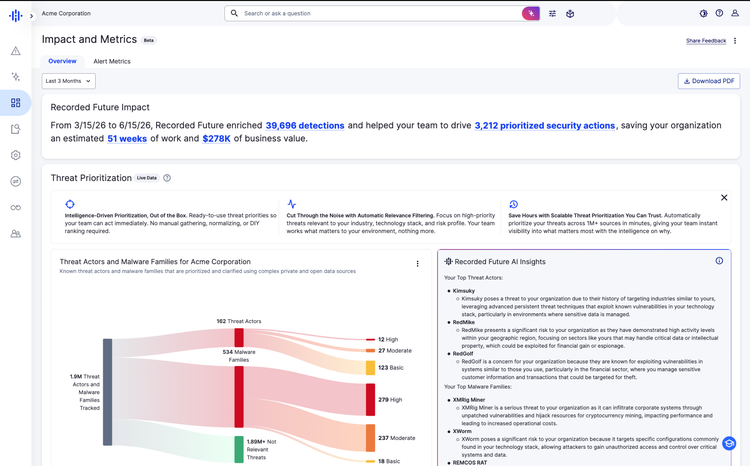
Today, Recorded Future is announcing the Impact and Metrics Dashboard, a new way for every Recorded Future customer to see the value their intelligence program generates without building reports by hand. The dashboard pulls data from your environment, alerts, integrations, threat detections, and analyst activity, then surfaces the metrics that map to the business and security outcomes your leadership cares about.
Security teams have always known that intelligence drives better outcomes. The hard part has been proving it in the language of the business. Boards, CFOs, and CIOs aren't asking for threat counts. They want measurable risk reduction tied to business context, and they want it in numbers they can defend.
Our 2025 ROI Report, validated across nearly 300 customers, puts numbers to what security teams already know. Recorded Future customers have reported achieving 351.3% ROI annually. 57% say the platform has substantially reduced their overall cyber risk. 96% would recommend it to a peer.
But the numbers that resonate most are not the averages. They are the attacks that your team was able to get ahead of. Ransomware stopped before detonation. Credentials reset before an adversary could use them. Fraud campaigns contained before they could reach customers. Until now, capturing that story meant pulling data from across the platform, stitching it together by hand, and rebuilding the same readout every quarter.
The most powerful version of that story is yours and that is what the Impact and Metrics Dashboard is built to show.
What the dashboard covers
Platform-Wide Security Value: Your headline number. Aggregate risk reduction and intelligence coverage across your environment, built for leadership conversations.
Threat Prioritization: See which threat actors and malware families are relevant to your organization, and how Recorded Future AI cuts noise so your team focuses on what matters. Customers who aligned their alerting to PIRs reported identifying new threats 65% faster.
Threat Detection: Understand how intelligence is moving through your security stack, from malware detected in your telemetry to integrations and threat hunting activity. Customers often receive critical alerts hours or days earlier than from other vendors.
Digital Risk Protection: Quantify exposure reduced from fraud, brand impersonation, and credential threats. For organizations with significant brand or customer risk, this is where ROI becomes immediately tangible and immediately explainable to a CFO.
Account & Credential Monitoring: See identity threats surfaced and remediated before they became incidents.
Recorded Future AI & Insikt GroupⓇ Research: Recorded Future’s expert Intelligence team & AI does the work for you, providing deeper insights than most teams could do alone. Measure analyst hours recaptured through AI-powered automation and the volume of expert research your team has put to work. Your efficiency case, in your own numbers.
Today the dashboard surfaces key metrics to start the conversation and give your team something concrete to point to. Over time the calculations will get more personalized, the benchmarks more specific to your organization, and the integration with your business context deeper.
The Impact and Metrics Dashboard is available now for every customer. To find it, navigate to Dashboards > Impact and Metrics in your Recorded Future instance. For setup help or questions, contact your Technical Account Manager (TAM).
Frequently Asked Questions
1. What is being launched today, and who can use it?
The Impact and Metrics Dashboard is a live, continuously updated view of the value your Recorded Future program is generating. It aggregates detections, prioritized security actions, time saved, and estimated business value and it is available now for every customer. To find it, navigate to Dashboards > Impact and Metrics in your Recorded Future instance. If you'd like help getting oriented, your account team can walk you through it.
2. What's the first thing I should do?
Set your Priority Intelligence Requirements (PIRs). The dashboard is only as useful as the intelligence program behind it, and your PIRs define what your team monitors, alerts on, and reports against. The dashboard surfaces metrics based on those requirements, so your reporting reflects how well your program answers the questions the business actually wants answered.
3. How do I set up PIRs?
In the platform, go to Settings and select Intelligence Requirements. Define your top PIRs based on your sector, your technology stack, and your known exposures. Then align your alerts, monitoring rules, and collections to those requirements. Review and update them at least quarterly, or whenever your threat environment shifts.
4. What metrics does the dashboard show?
It's organized into six areas. Platform-Wide Security Value is the aggregate view of risk reduction across detections, prioritized security actions, weeks of work saved, and estimated business value. Threat Prioritization shows which threat actors and malware families are relevant to you and why, ranked into High, Moderate, and Basic priority, with an AI summary for context. Threat Detection covers detected malware in your telemetry, connected integrations, threat hunting, and the sandbox. Digital Risk Protection covers your external exposure across fraud, brand impersonation, and credential threats. Account and Credential Monitoring shows compromised credentials and how quickly they're identified. And Recorded Future AI and Insikt Group Research shows how your team is using AI-powered automation and expert research to extend analyst capacity.
5. Which metric should I lead with in a leadership conversation?
Start with Platform-Wide Security Value. It summarizes the impact of your program in one number that ties to business value, which makes it the natural opening slide for any executive or board readout. Then use the other sections to tell the story behind that number, one or two specific examples are usually enough to give it context.
6. How does the dashboard make the efficiency case for my program?
The Recorded Future AI and Insikt Group Research section shows reports generated and delivered, plus Insikt Group notes read across types like Flash Reports, finished intelligence, and authored detection rules. Report creation is one of the most time-consuming things an intelligence team does, and AI-generated reports cut that effort while expert research expands your effective bench without adding headcount. A growing trend here is a clean way to show leadership that your program is doing more with the same team.
7. How often should I look at it?
Monthly to track changes and surface new impact figures for your team. Quarterly as the foundation for your business review deck, your account team can help pull the relevant metrics and contextualize them against your PIRs. And at renewal, to demonstrate program value and build the case for continued or expanded investment.
8. Can I get the metrics into a deck?
Yes. Use the PDF download to export dashboard metrics directly into your business review deck or stakeholder presentation, which can meaningfully cut the time you spend preparing leadership readouts.
9. How will the dashboard evolve, and how can I influence it?
Expect more personalized calculations, benchmarks more specific to your organization, and deeper business context over time. Use the Share Feedback button inside the dashboard or speak with your account team to tell the product team what would make it more useful. That feedback directly shapes how it evolves.
10. Where can I learn more?
Contact us for a demo or reach out to your account team. For more technical details, see our support documentation.